
With ReadyRefresh membership, you can order beverages, coffee, water dispensers as well as other items that will be delivered to your home. You can also customize your beverage delivery service with ReadyRefresh. Of course, you will have to purchase a membership to use the ReadyRefresh water delivery service.
However, if you’re already a ReadyRefresh member but you’re tired of paying your subscription every month, what you should do is cancel your ReadyRefresh membership. If you do not know yet how to cancel your ReadyRefresh membership, you can find the guide through our post below!
Cancelling Your ReadyRefresh Membership, Here’s How!
It’s pretty straightforward to cancel your ReadyRefresh membership, since ReadyRefresh allows its members to cancel their membership at any time. You can cancel your ReadyRefresh membership using the following methods:
Method 1: ReadyRefresh Customer Service Number by Making a Phone Call
Making a phone call is one way to cancel your ReadyRefresh membership, since the customer support team can respond to your questions directly. But make sure to tell them clearly that you want to cancel your ReadyRefresh membership.
To make a phone call to ReadyRefresh Customer Support, you can dial:
1-800-4-WATERS (1-800-492-8377)
Monday – Friday
8 AM – 9 PM Eastern Time
Mailing Address
If you need to send correspondence or make a payment by mail, you can use the payment address shown on your latest ReadyRefresh invoice.
For payments, use the remittance address on the bottom right of your most recent invoice.
During a phone conversation, make sure to talk with ReadyRefresh Customer Support and inform them that you want to cancel your ReadyRefresh membership.
You also need to give them details about your account such as your email address, your profile name, etc. After it is done, ask ReadyRefresh customer support to send a confirmation letter or email to you.
Method 2: Submitting a Request
You can also cancel your ReadyRefresh membership by submitting a request. To submit your request, you will have to fill out a request form first.
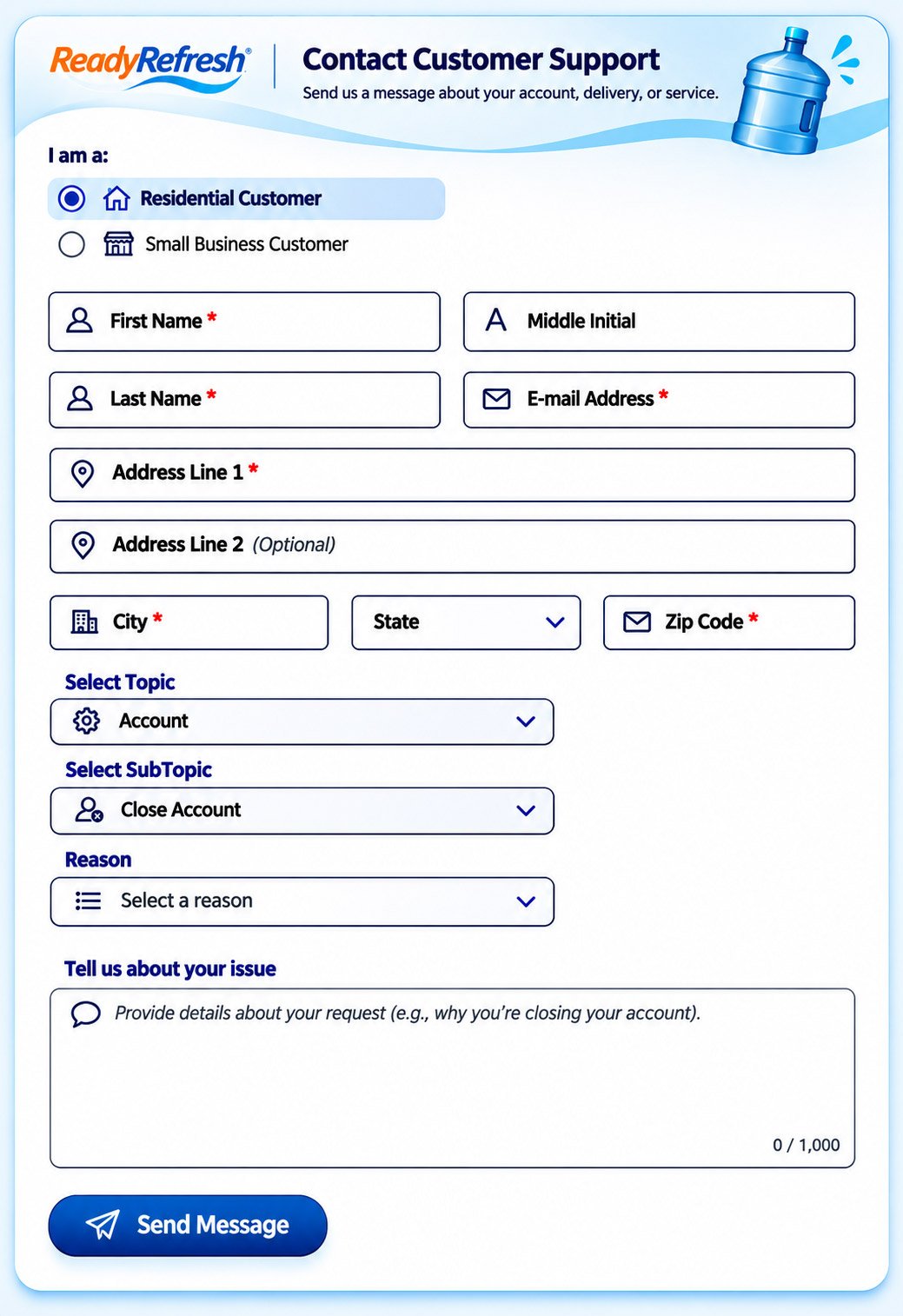
After finding a request form, you may need to provide your personal information such as your first name, your last name, your address, your ZIP code, your phone number, etc. Make sure to tell them clearly that you want to cancel your ReadyRefresh membership. After the form is filled out, you can then submit your request and send it to ReadyRefresh customer support.
Method 3: Sending an Email
In addition to making a phone call and submitting a request, you can also contact ReadyRefresh customer support by email. However, the current membership terms list phone calls and the Contact Us form as the official ways to cancel a membership.
If you still want to contact customer support by email, you can use the following steps:
- First, open your email account.
- On the email address field, enter CustomerService@ReadyRefresh.com.
- Now, you can compose an email. Make sure to tell them that you want to cancel your ReadyRefresh membership.
- On the email subject, you can type ‘Request to Remove My Information and Cancel My ReadyRefresh Subscription’, ‘Request to Cancel My ReadyRefresh Subscription’, or ‘Membership Cancellation Request’.
- Last, click on the ‘Send’ button to send your email.
If you use this method, make sure to ask customer support whether they can process your cancellation request by email. You should also ask for confirmation once your membership has been canceled.
Okay, those are some methods to cancel your ReadyRefresh membership. If you really want to cancel your ReadyRefresh membership, make sure to take the easiest and fastest way, so that you can quickly cancel your membership and you will not be charged the membership fee again.
It’s important to note, if you cancel your ReadyRefresh membership within three business days of registering, ReadyRefresh will then refund your full membership fee, provided that the ReadyRefresh company may charge you the value of any membership benefits that are used by you and your account during said three-day period. However, if you cancel at any other time, your membership fee will not be refunded.
Please also note that ReadyRefresh membership plans generally have a one-year term and may automatically renew unless you notify the company before the next charge that you want to cancel or do not want to renew. Some plans, including bundle plans, may also have an early cancellation fee. For example, the current terms state that canceling a bundle plan can result in a one-time breakage fee of up to $25. Make sure to check the terms and conditions that apply to your account before canceling.
Registering for a Ready Refresh Account, Here’s How!
If you want to try using Ready Refresh water delivery service, you definitely need to register first. Well, registering for a Ready Refresh account is as simple as canceling your Ready Refresh account. So, if you want to register for a Ready Refresh account, you can do the following steps below.
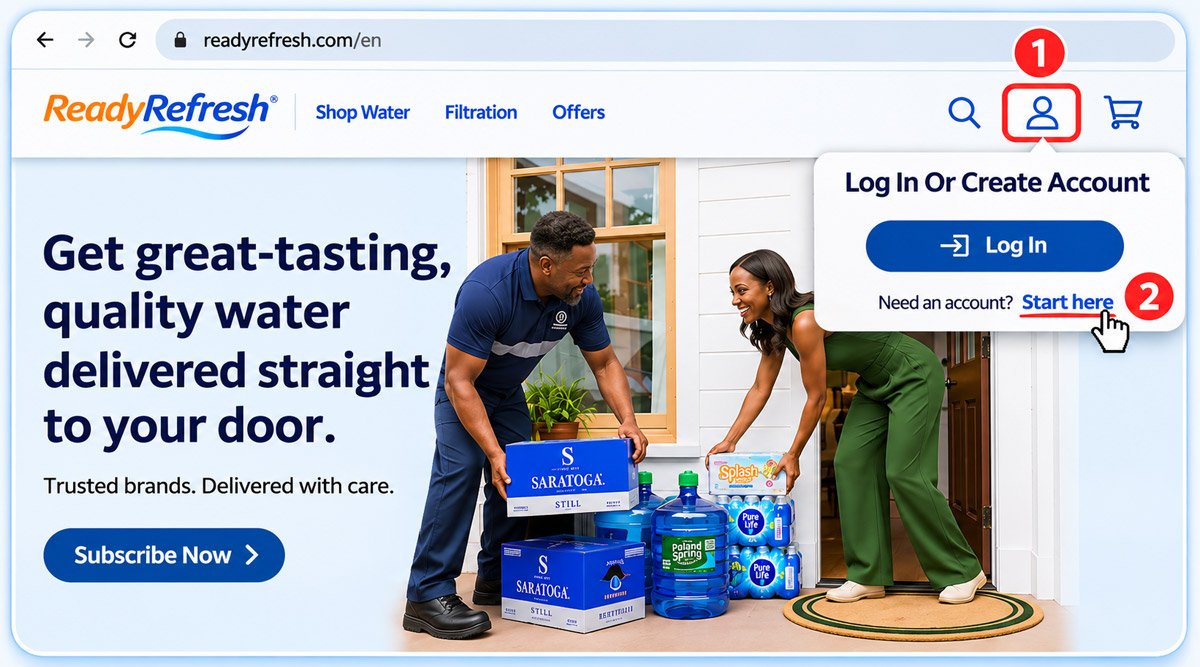
- First, go to the official site of Ready Refresh.
- Once you are at the homepage of Ready Refresh, you can click on the ‘Log In’ button.
- On the Login page, you can find the ‘Register’ link and then click on it.
- In the following page, you will need to provide your email address to verify your identity.
- After that, Ready Refresh will send a code to your email. Make sure to enter the code in the following step.
- Afterwards, you can start to create your account by providing your personal information such as your first name, your last name, your address, your billing and payment information, etc.
If you follow the on-screen instructions, you will successfully create a Ready Refresh account and start to use Ready Refresh Water Delivery.
How to Login ReadyRefresh
If you have a current customer account, you can visit this official page here.
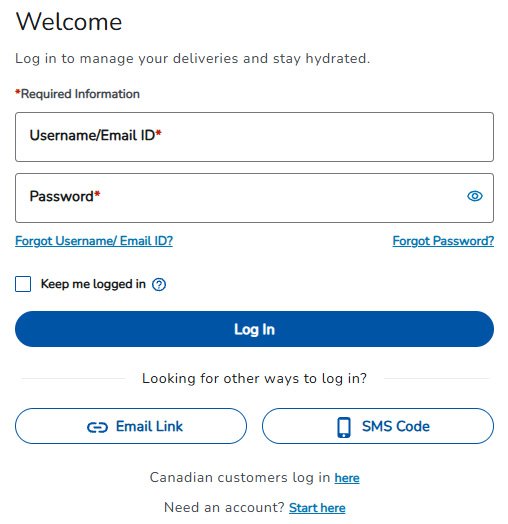
What If You Have a Login Issue?
Sometimes, you may not be able to log in to Ready Refresh due to a login issue. Of course, login issues can be caused by several reasons. Here they are:
1. Forgot Your Username
If you forgot your username, you can visit the Forgot Username page. You can then enter your account number and delivery ZIP code associated with your account. It’s important to note that your account number will appear at the top left of the first page of your monthly statement.
2. Forgot Password
If you forgot your password, you can visit the Forgot Password page. You can then enter your username. It’s important to note that your username may be the email address associated with your account.
3. Forgot Both Your Username and Password
If you forgot both your username and password, you will need your account number and ZIP code. Of course, you will have to complete a two-step process:
- You can go to the Forgot Username page and enter your account number and delivery ZIP code associated with the account to see your username.
- You can then go to the Forgot Password page and enter your username. You can also request an email to reset your password or reset your password by re-entering your account information. Then, you will be able to log in after your account is reset.

